DexCexRadar — Telegram Bot for Crypto Arbitrage CEX ↔ CEX and CEX ↔ DEX
DexCexRadar is a Telegram bot for crypto arbitrage that helps users find arbitrage opportunities across CEX ↔ CEX, CEX ↔ DEX and hybrid scenarios. The bot analyzes prices, order book depth, DEX liquidity and quickly sends alerts through a convenient Telegram interface.
The product is built not only for speed, but also for execution quality. That is why DexCexRadar looks not only at price gaps, but also at real market factors such as liquidity, order book depth, route availability and listing relevance. This makes CEX DEX arbitrage more practical and the alerts more useful for real trading.
Although the bot is understandable even for beginners, we still recommend reviewing the main settings in advance. Below you can see how the crypto arbitrage bot works, what advantages it gives and how to configure monitoring for your trading style.
Adding tokens
When a token is added, DexCexRadar automatically checks whether the contract is supported by centralized exchanges and filters out unsuitable options. At the same time, the bot does not guarantee deposits and withdrawals on an exchange — the user should verify this independently before trading.
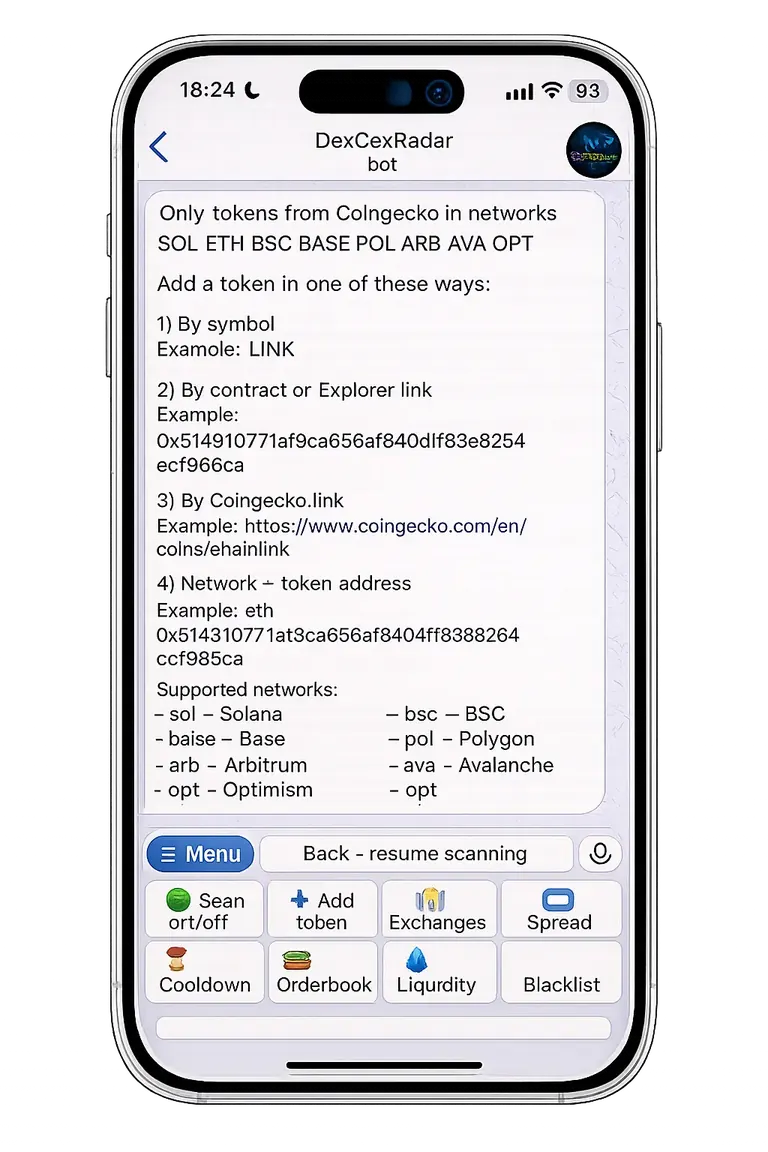
DexCexRadar lets you add a token to the whitelist in four ways:
- by symbol
- by explorer link
- by contract
- by CoinGecko link
If a token participates in a DEX scenario, the bot looks for the most suitable liquidity pool based on price closeness to CEX and a minimum DEX liquidity of $1000 in balanced form. The system also re-checks pools over time and may later find a stronger option.
If a token is available on at least two supported CEX venues, DexCexRadar can also suggest a mode without DEX.
Why the bot may fail to add a token
- arbitrage needs a working CEX + CEX or CEX + DEX route
- a token may be listed on CoinGecko but not actually supported by the exchange
- DEX liquidity may be too low
- the token may be missing on CoinGecko or have no suitable contract
- the bot tracks listings and delistings and can filter pairs earlier than external catalogs update
Important note
If you add a token by CoinGecko link, one page can sometimes combine legacy / old / new token versions. In such cases, adding the token by symbol is usually safer.
Recommendation
For crypto arbitrage, medium-liquidity tokens are often more useful than overheated top assets, because market inefficiency appears there more often. For a crypto arbitrage bot, such tokens can often generate more interesting alerts.
Scanning modes and exchange selection
DexCexRadar supports three main working modes:
- CEX ↔ CEX
- CEX ↔ DEX
- CEX + CEX + DEX
This allows the bot to fit different strategies: track only centralized exchanges, search for routes between CEX and DEX or combine both approaches.
DexCexRadar already works with 12 CEX, 40+ DEX and 8 networks, while keeping a Telegram-first workflow and second-fast signal delivery.
Exchange selection
Users can manually disable exchanges that do not fit their trading style. This is useful when a venue creates noise, has slow price streams or does not match the desired execution quality.
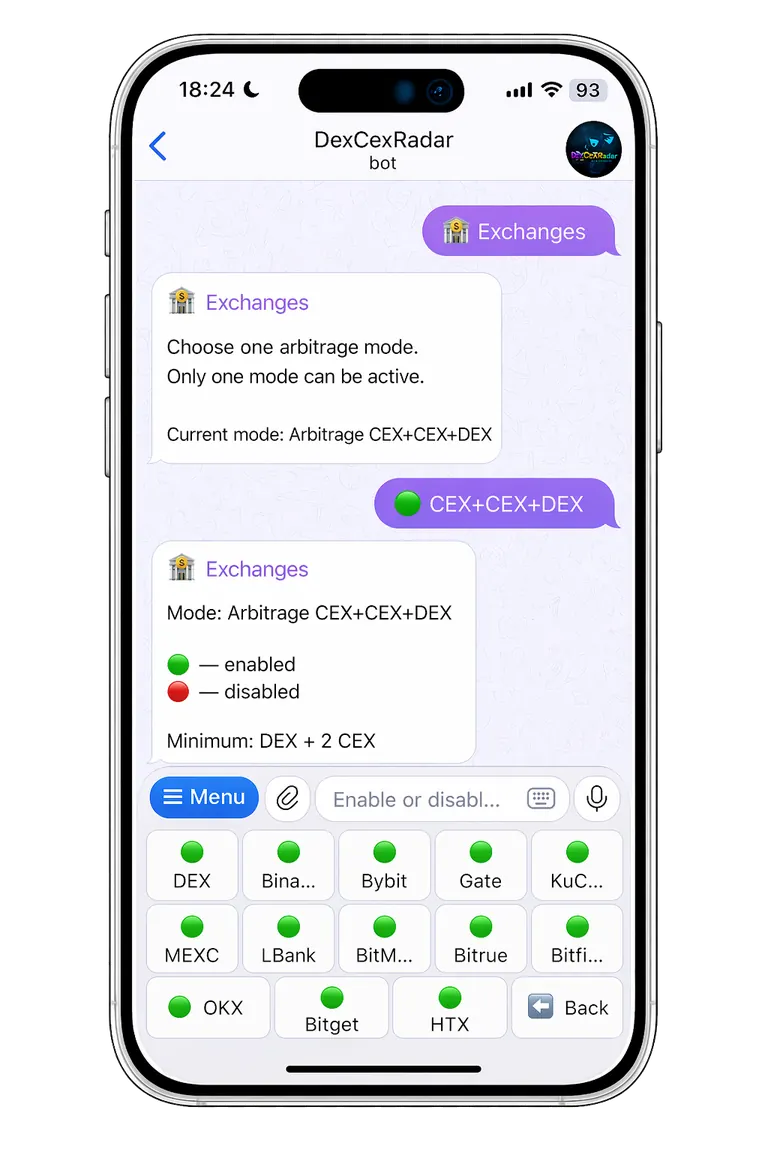
This approach helps keep signals cleaner and focus only on liquidity sources that really matter for your strategy.
Spread, cooldown, order book and liquidity settings
This section contains the key monitoring parameters. They can be changed both for a single token and for all tokens at once.
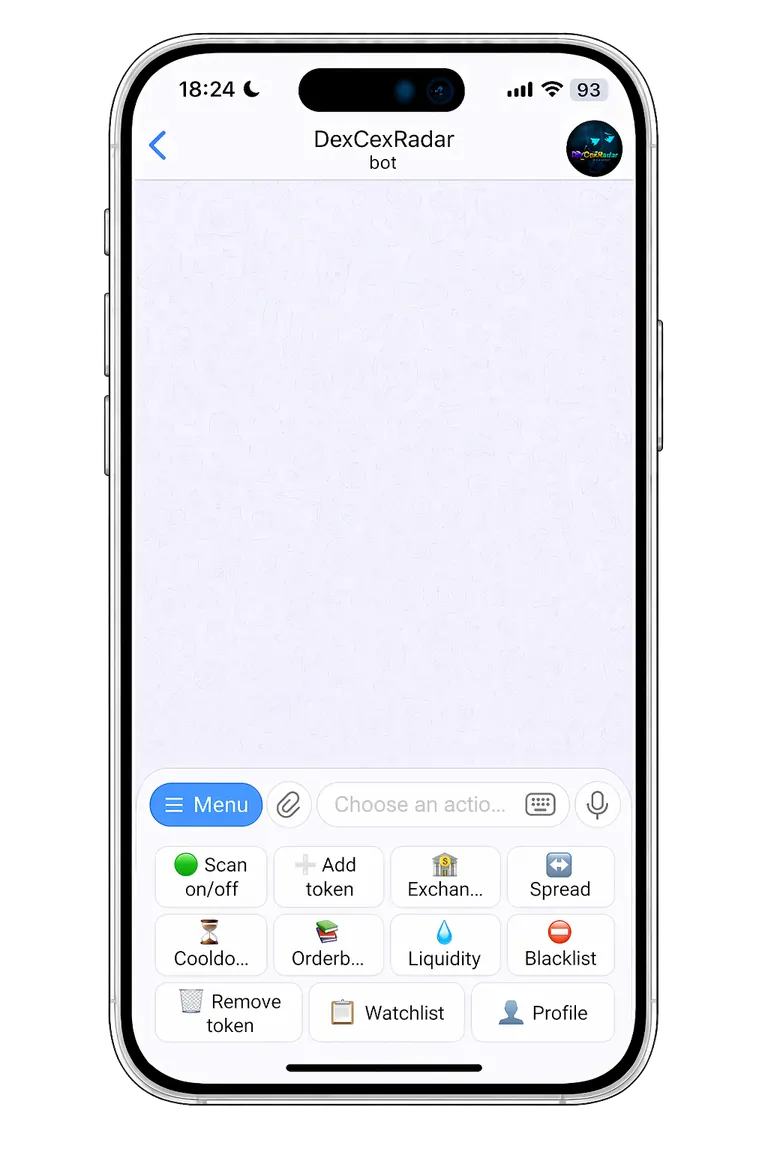
Spread
Spread is the percentage price difference between markets. In practice, this is the potential profit percentage the bot looks for in a signal.
Cooldown
Cooldown is the delay between repeated signals for the same scenario. It is needed so the bot does not send identical alerts too often.
Order book
The order book parameter helps estimate how realistic a CEX trade is, taking order depth and allowed price deviation into account. This is an important part of execution filtering.
Liquidity
The liquidity parameter is used for DEX markets. It helps filter out weak and low-quality pools where the price may look attractive, but the actual trade would be unexecutable or too risky. For CEX DEX arbitrage, this part is especially important because a beautiful price without liquidity does not provide a real entry.
Token removal
If a token is no longer needed in monitoring, it can be removed from the whitelist in one click.
Whitelist
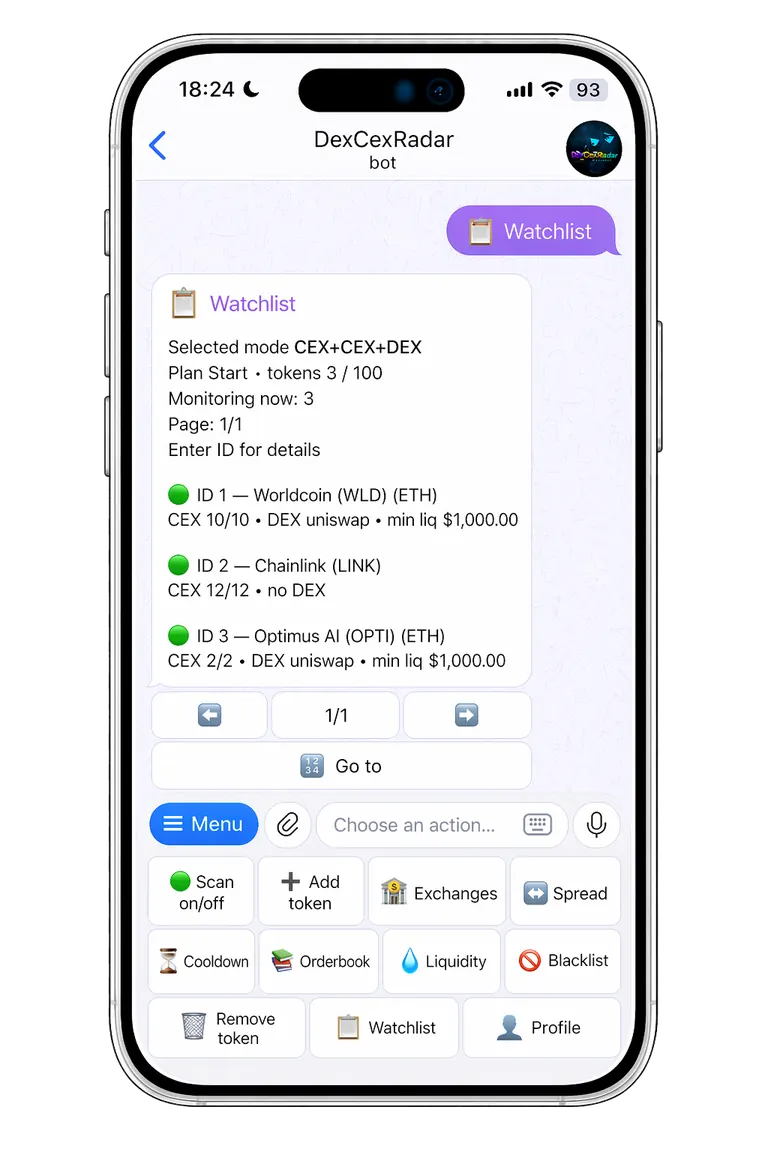
The whitelist shows all tokens you have added. Here you can see their current status, the number of available exchanges and whether DEX liquidity is present.
What token status means
- 🟢 the token participates in the current monitoring mode
- 🟡 the token has started losing working pairs or is partially degrading
- 🔴 the token has not participated in a full working scenario for a long time
DexCexRadar automatically tracks listings, delistings and changes in market quality. Token status also depends on the selected scanning mode. For example, if a token was added without DEX and you have CEX ↔ DEX mode enabled, it will not participate in monitoring in that mode.
For each token, you can open more detailed information and see which exchanges are active, which were disabled manually and where support issues may exist. This makes the Telegram bot for crypto arbitrage more transparent and easier to control.
Blacklist
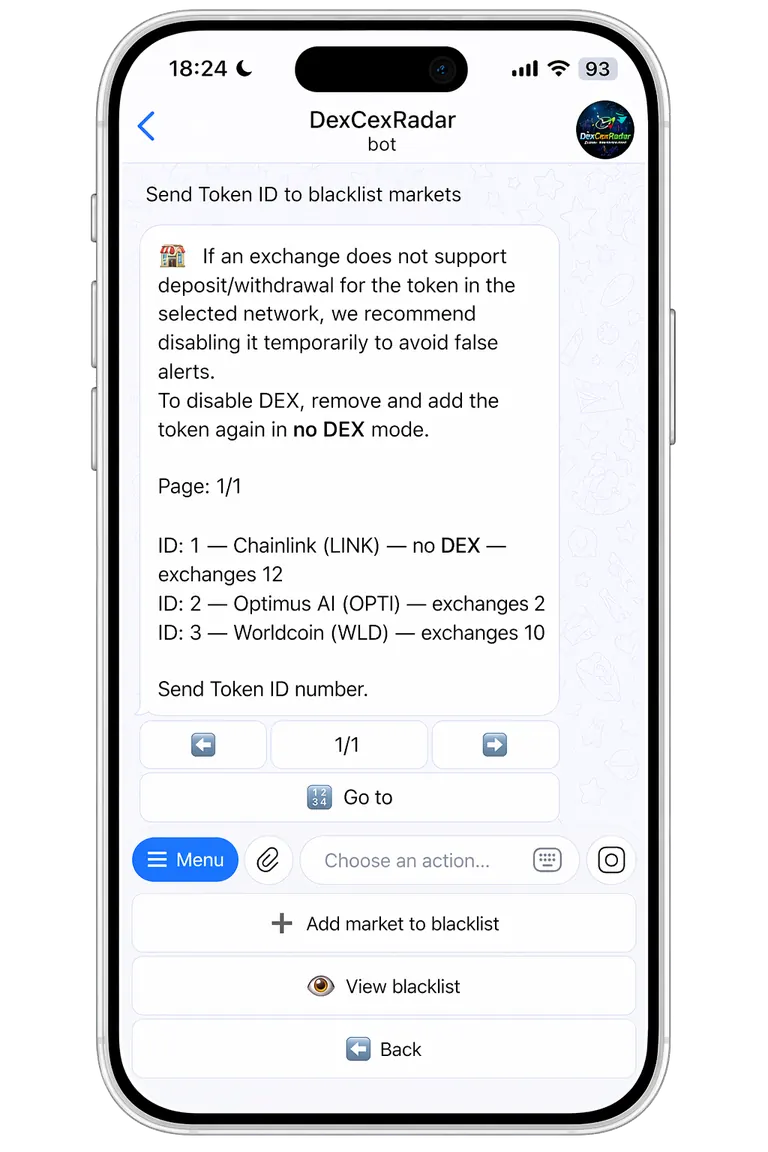
The blacklist is used for fine noise filtering.
You should add specific markets and exchanges here when you do not want to disable them globally, but they regularly produce weak or irrelevant signals. This is especially useful if certain venues publish delayed prices, support a token inconsistently or create too many unnecessary notifications.
A properly configured blacklist helps you avoid drowning in noise and not miss genuinely strong signals.
If you need to remove only the DEX part of a token from monitoring, it is usually more correct to delete the token and add it again without DEX. For a crypto arbitrage bot, this is an important way to reduce noise and improve signal quality.
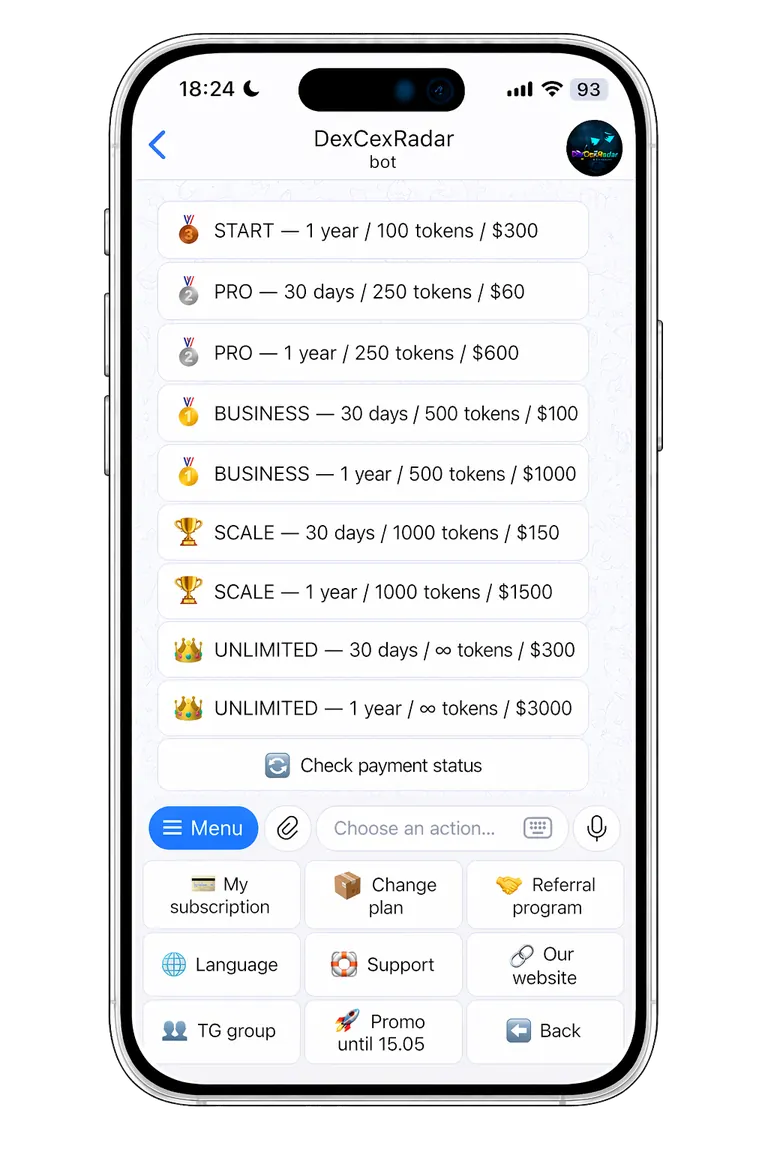
Pricing plans
DexCexRadar offers several pricing plans — from a free starting tier to more advanced options for active use.
The free plan is suitable for getting familiar with the product and making an initial evaluation of signal quality. After that, users can gradually move to a higher plan as their needs grow.
One of the product’s advantages is convenient plan upgrading. The system takes the remaining time of the current plan into account when switching to a new one, making the upgrade process more comfortable for the user.
Payments are processed through the Plisio crypto payment gateway. The website also highlights that the product has a free plan and a thoughtful pricing structure. This is convenient for users who want to test the crypto arbitrage bot first and then move to more active usage.
Referral program
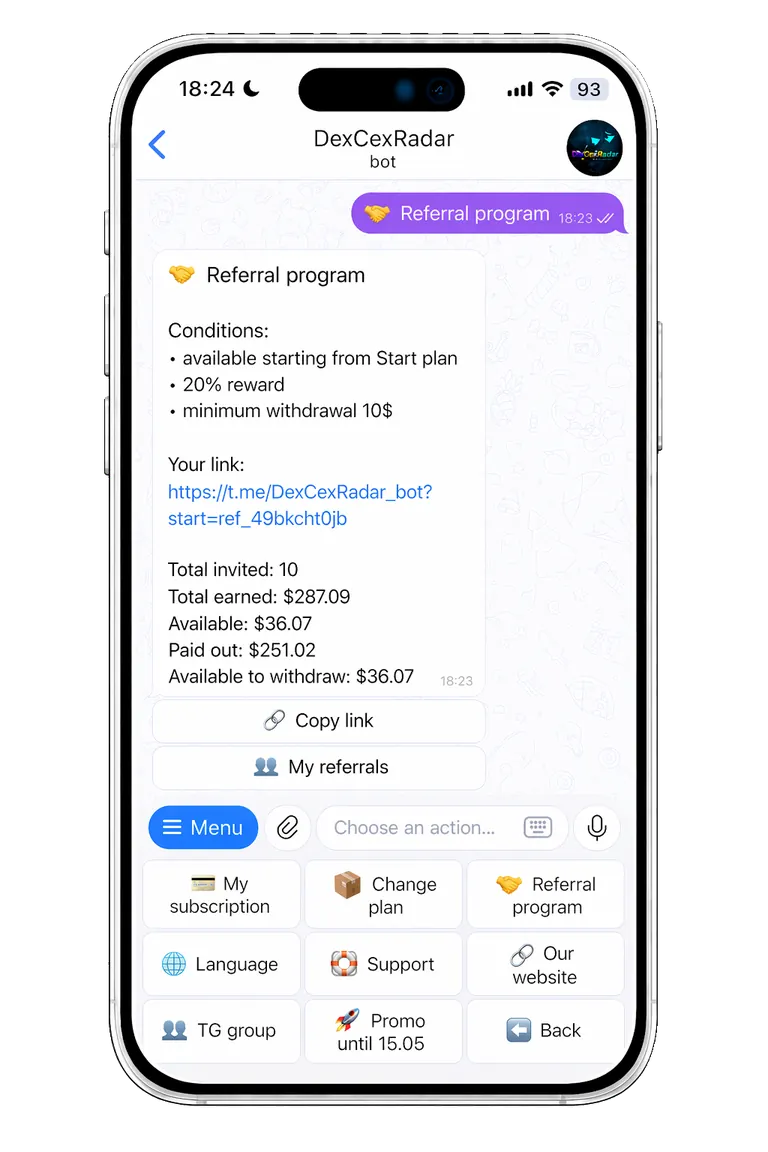
Users who have already evaluated DexCexRadar and activated a paid plan can take part in the referral program.
After activating an eligible plan, the bot provides a referral link that can be shared with other users to earn a percentage of their purchases.
Main conditions
- reward — 20%
- minimum withdrawal amount — 10 USD
- available payout methods:
- USDT on BNB Smart Chain
- USDT on Solana
Payouts are processed quickly through the connected crypto payment gateway.
Signals
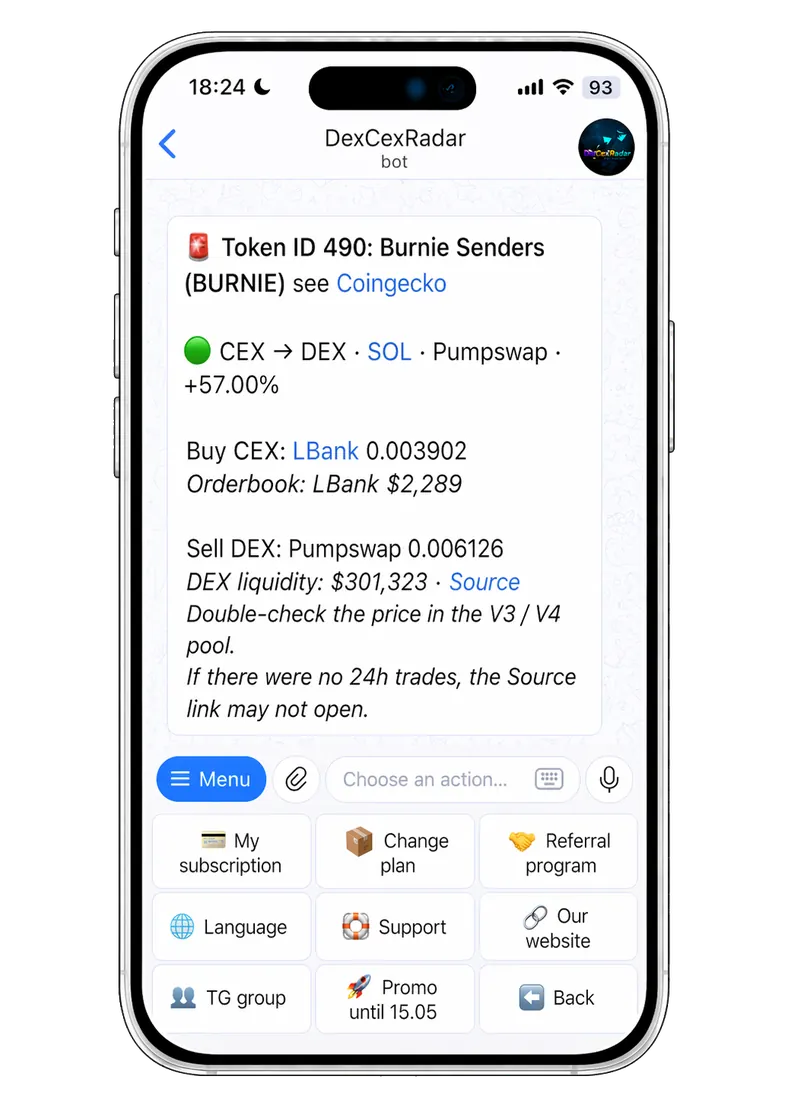
Alerts sent by our Telegram bot for crypto arbitrage DexCexRadar.
Signals in DexCexRadar arrive quickly and are formed based on your settings:
- selected exchanges
- minimum spread
- order book depth
- liquidity
- cooldown
- route filtering logic
This helps the Telegram bot for crypto arbitrage show signals that are more useful and closer to real execution, rather than simply showing a nice price gap. Also remember to use the blacklist regularly and adjust the set of markets to fit your strategy — this reduces the amount of low-quality alerts.
If a DEX source link inside a signal does not open, it may mean there has been no activity in the pool for a long time. In that case, the price should be checked especially carefully.
Important before a CEX trade
Before buying or selling on a centralized exchange, always check:
- current price
- order book depth
- token deposit and withdrawal availability
Important before a DEX trade
Before buying or selling on a DEX, always re-check the price and the quality of the pool. Some pools, especially v3/v4 pools, may display the price incorrectly.
Summary
DexCexRadar is a convenient and clear Telegram bot for crypto arbitrage that works both for getting started and for more advanced work with arbitrage scenarios. The bot helps users quickly find opportunities between CEX ↔ CEX, CEX ↔ DEX and hybrid routes, while keeping the main controls directly inside Telegram.
At the same time, it is important to understand that even the fastest crypto arbitrage bot does not replace basic trade verification. If you regularly filter noise, configure the blacklist and monitor route quality, working with the bot becomes easier and the signals become noticeably more useful. DexCexRadar is a Telegram bot for crypto arbitrage that combines speed, noise filtering and execution control in one interface.
Ready to launch DexCexRadar?
DexCexRadar is a Telegram bot for crypto arbitrage and arbitrage signal discovery across CEX ↔ CEX, CEX ↔ DEX and hybrid scenarios. Fast signals, order book checks, liquidity analysis and convenient settings.